
I Built My App With AI. Is It Safe to Launch?
Short answer: Many apps built with AI coding tools are not safe to launch as they are. In one 2026 scan of 1,072 live AI-built apps, 98% had at least one security flaw. Before launch, confirm that customers can't see each other's data, your database is locked to the public, secret keys aren't in the browser, the server sets prices, and admin pages are locked.
This year, a security firm scanned 1,072 live apps built with AI coding tools such as Lovable, Bolt, v0 and Replit. 98% had at least one security flaw. In 172 of them, about 1 in 6, a stranger with no login could change or delete data in the app's database.
A separate scan in August looked at nearly 31,000 AI-built apps. Of the 3,680 Supabase-backed apps it could check, 57% had at least one database table anyone could read without logging in.
None of this means you did something wrong. It means the tool did what you asked and nothing more. Before you put real customers, real data or real payments into your app, run these 8 checks.
Why do AI-built apps have so many security holes?
AI coding tools are very good at making an app that works. They are not built to ask what happens when someone tries to break it. If you asked for a login page, you got a login page. You probably didn't ask for a check that stops one logged-in customer from reading another customer's records, so the tool didn't add one.
That is why the same handful of holes shows up across thousands of apps. They aren't exotic. They are the safeguards a developer adds out of habit, because experience teaches you what attackers try first.
I use AI coding tools every day in my own work. The difference is that I read the code, test it with hostile input, and approve every release myself. This checklist gives you a first pass at that review.
How do I check if my AI-built app is safe to launch?
You can run checks 1, 3, 5, 6 and 7 yourself in a browser. The others need a look at your settings or a question for whoever built the app.
1. Can one customer see another customer's data?
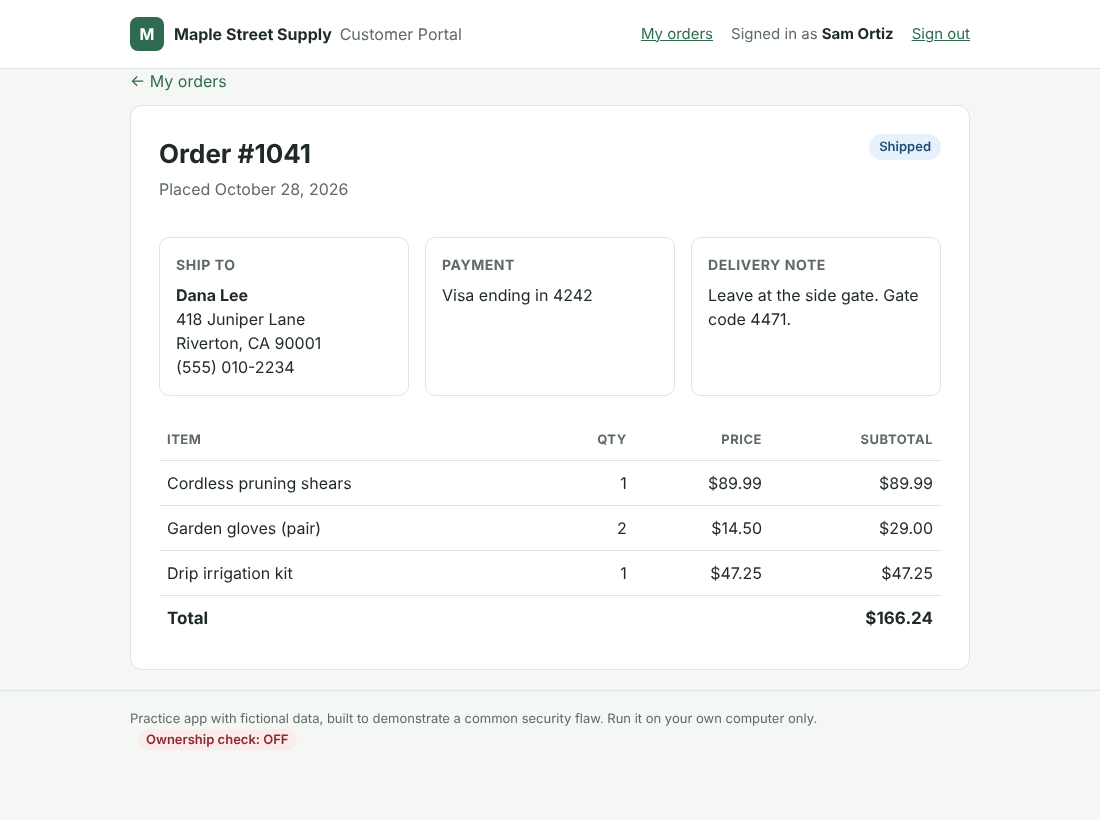
This is one of the most common serious holes in AI-built apps. Create two test accounts. Log in as the first, open a page that shows that account's order or profile, and copy the address. If the address has a number or ID in it, log in as the second account and paste it, or change the number by one.
If you can see the first account's data, the app is checking that you are logged in but not that the record is yours. Fix: the server has to confirm, on every request, that the record belongs to the person asking.
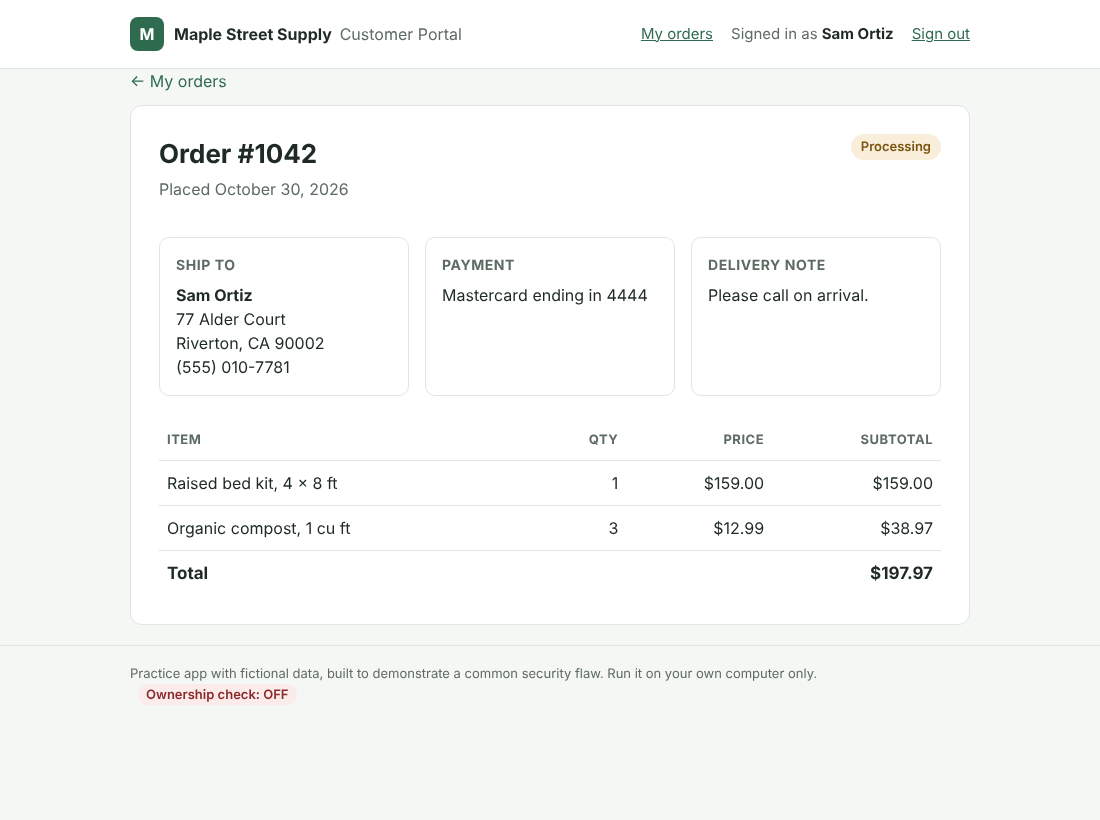
Here is what that looks like in a small practice app with this exact flaw. Signed in as one customer, Sam, the app shows his own order:
Change 1042 to 1041 in the address bar, and the app opens another customer's order. The header still says Sam is signed in, but the page shows Dana's home address, phone number and gate code:
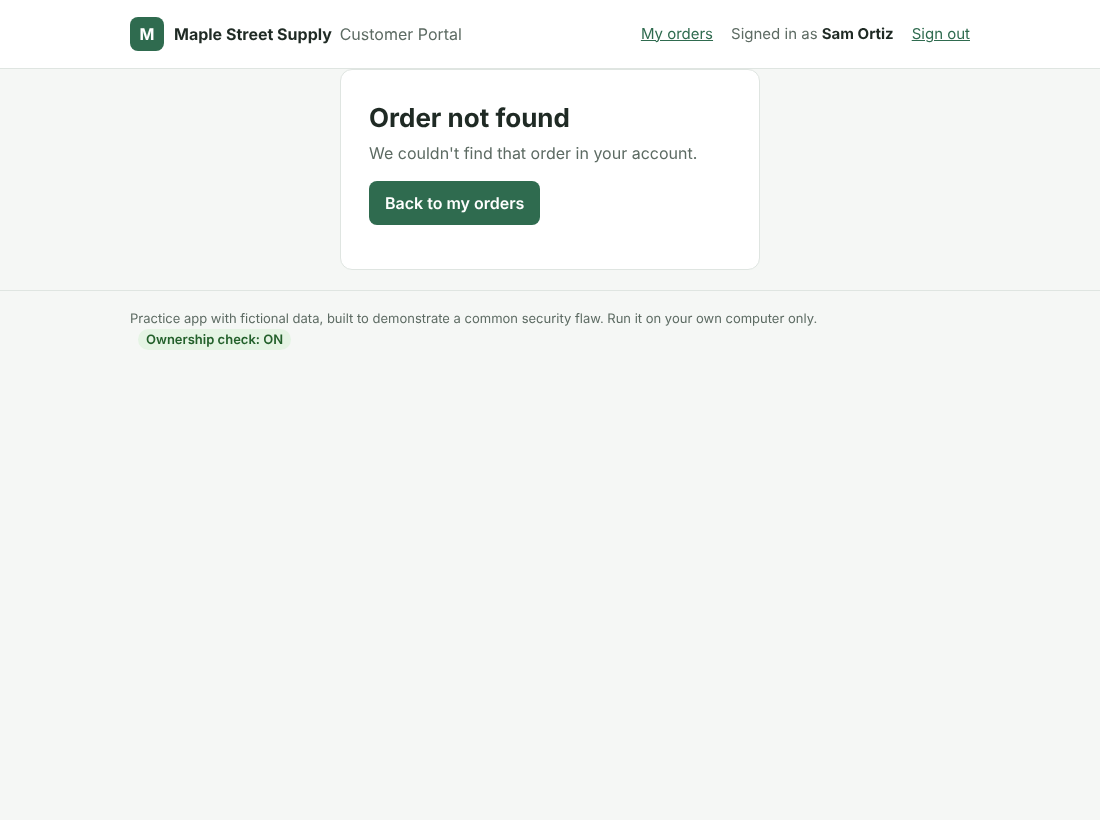
With the ownership check added on the server, the same request shows "Order not found":
2. Is your database locked to the public?
If your app uses Supabase, every table needs Row Level Security turned on. Supabase's Security Advisor in your project dashboard lists the tables that don't have it. Firebase apps need database rules that are not open to everyone.
Fix: turn on Row Level Security for every table, then decide on purpose which tables, if any, should be public.
3. Are secret keys sitting in public code?
Open your app in Chrome, press F12 to open Developer Tools, go to the Sources tab, and press Ctrl+Shift+F (Cmd+Option+F on a Mac) to search all of the app's files for words like "secret," "sk_live" and "service_role." Some keys are meant to be public, such as a Supabase "anon" key, but that one is only safe when check 2 passes. A Stripe secret key or a Supabase service_role key should never appear in the browser.
Fix: move secret keys to the server. Then replace any key that was ever exposed, because someone may already have copied it.
4. Does the server set the price?
Ask the AI tool or your developer one question: "Where is the order total calculated?" The answer should be "on the server, from our own product prices." If the browser sends the price, someone can change it to one cent.
Fix: calculate totals on the server, verify the payment processor's webhook signatures, and mark an order paid only after the processor confirms it.
5. Who can reach the admin pages?
Log out, or log in as a regular customer, and type the admin address directly, such as /admin or /dashboard. Hiding the admin button is not the same as locking the page.
Fix: a server-side role check on every admin page and every admin action.
6. What happens when someone types something hostile?
In a search box or form, type an apostrophe (') and submit it. Then try <b>test</b>. An error page full of database details, or the word "test" showing up in bold, is a warning sign.
Fix: parameterized database queries and escaped output. Experience has taught me to test every form with input that is meant to break it.
7. Can someone hammer your login or signup?
Enter a wrong password 20 times and see whether anything slows you down. Check that new accounts must confirm their email address. If your app calls a paid AI service, an open signup form can also run up your bill.
Fix: limit login attempts, require email confirmation, and add a CAPTCHA to public forms.
8. Can you recover from a bad day?
If someone deleted your data tonight, could you get it back tomorrow? Check that your database plan includes automatic backups, and restore one to a test copy at least once. Some free plans don't include backups.
Fix: turn on daily backups, keep a copy outside the platform, and write down how to restore it.
When should you stop prompting and call a developer?
Keep building with AI. Bring in a person when any of these are true:
- Any of checks 1 through 5 failed.
- Your app takes payments, or stores health, financial or other personal information about people.
- You have asked the AI to fix the same bug three times, and each fix breaks something else.
- There is a part of the app you can't explain.
- You are about to sign a customer contract, raise money, or fill out a security questionnaire.
Some problems are a quick fix. When they run through the whole app, rebuilding on a solid foundation is usually faster and safer than patching it one prompt at a time.
Should you patch or rebuild your AI-built app?
If your app failed several of these checks, or it handles payments or personal data, patching it one prompt at a time can make things worse. Web Shopping Systems rebuilds AI-built apps as lean core PHP applications that you own outright. The rebuild keeps the features your customers use. Underneath, every page checks who is asking, secrets stay on the server, and every release is tested with expected and hostile inputs before it goes live.
If you'd like to talk about a rebuild, request an estimate or call 888-508-0830. Please feel free to reach out with any questions.
AI-built app security: frequently asked questions
Is it safe to build an app with Lovable, Bolt or Replit?
Building with them is fine. The risk is launching without checking the app's settings and code. In one 2026 scan of 1,072 live apps built with these tools, 98% had at least one security flaw, and the critical ones mostly let strangers read, change or delete database records without logging in.
Is the Supabase anon key safe to expose?
Yes, the anon key is designed to be used in the browser, but only when Row Level Security is turned on for every table. Without it, anyone with the key can reach your data. The service_role key must never appear in the browser.
Can AI fix the security holes it created?
Sometimes, when you name the exact problem and then test the fix yourself. AI tools are much less reliable at finding holes you didn't ask about, which is why a checklist or a human review matters.
What should I do if my app fails check 1?
Stop adding features and fix it before more customers sign up. Every page and API request that returns a record has to confirm the record belongs to the person asking. If the same flaw shows up in many places, a rebuild may be faster than patching each one.
About the author
Kimberly Carr has written web software in core PHP for 25 years. She rewrote and maintained the GiveDirect.org fundraising platform from 2012 to 2021, including its donor portals, accounting and payment processing, and her code for a U.S. Department of Housing and Urban Development project passed its security review on the first review. She runs Web Shopping Systems, where she builds and rebuilds custom PHP applications with Claude Code and reviews every release herself.