
PHP 8.2 Ends December 31, 2026: What Business Owners Need to Do Now
Short answer: PHP 8.2 stops receiving security fixes on December 31, 2026. Upgrade to PHP 8.4, which is supported until December 31, 2028, and test the upgrade on a staging copy first. Until then, make sure you are on PHP 8.2.35 or later, which fixes the PHP2Shell flaws.
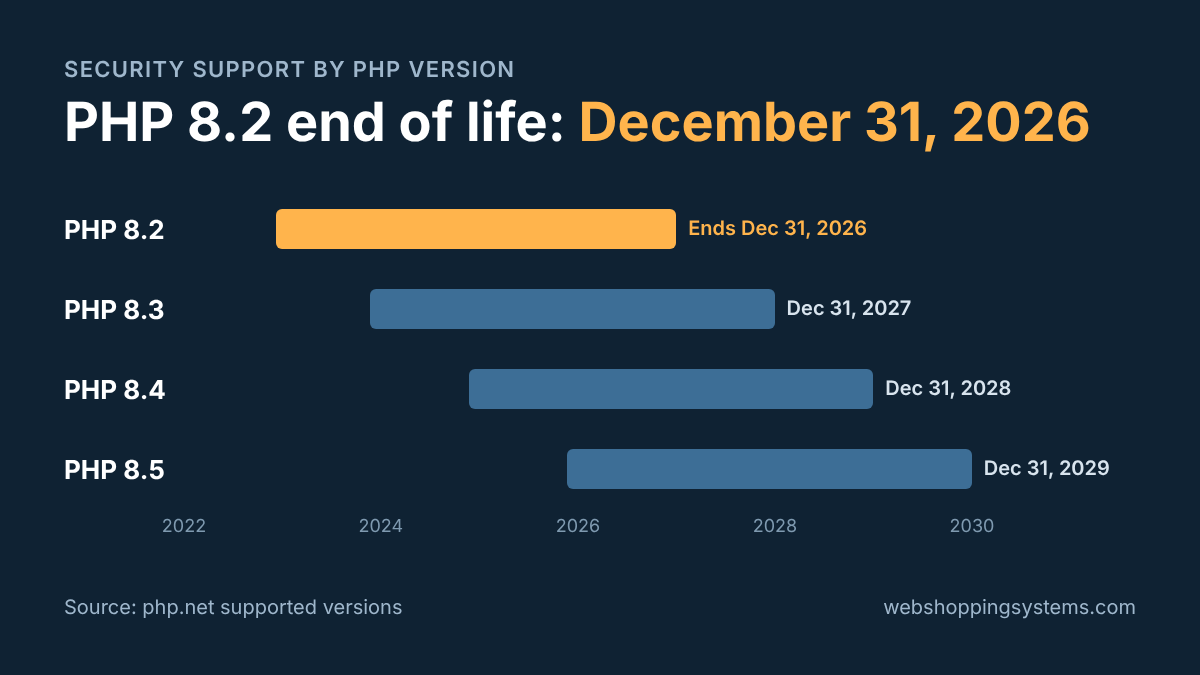
PHP 8.2 stops receiving security fixes on December 31, 2026. If your website or web application runs on PHP 8.2 or older, any security hole found after that date stays open for good.
October showed what that looks like. On October 21, the PHP project released emergency fixes for two critical flaws, nicknamed PHP2Shell, that let an attacker run code on a server without logging in. Five days later, CISA added both flaws to its list of vulnerabilities being exploited in real attacks.
Sites on PHP 8.2 and newer got a patch. Sites on PHP 8.1 or older got no official release, because those versions were already past end of life. On October 21, one threat-intelligence firm counted roughly 1.9 million internet-facing services reporting PHP 8.1 or earlier. On January 1, PHP 8.2 joins that group.
I have been programming in core PHP for 25 years, including nine years rewriting and maintaining the GiveDirect.org fundraising platform and its payment processing. Here is what end of life means for your business, how to check your version, and what your options are.
What happens when PHP 8.2 reaches end of life?
Your site will not go dark on January 1. It will keep working exactly as it does today. What stops is the security fixes. When a new hole is found in PHP 8.2 after December 31, the PHP project will not release a patch for it.
Your hosting company may not wait for that date. Acquia, a large managed host, stopped supporting PHP 8.2 on October 1, 2026, and moves any remaining sites to PHP 8.4 automatically. Other hosts can do the same thing on their schedule instead of yours. That is how a site that worked on Friday shows a blank page on Monday.
The safest upgrade is the one you test and schedule yourself.
How do I check which PHP version my site runs?
You don't need to be a programmer for this. Try these in order:
- WordPress sites: go to Tools → Site Health → Info, then open the Server section. The PHP version is listed there.
- cPanel hosting: log in and open "MultiPHP Manager" or "Select PHP Version." Most managed hosts also show the PHP version on the site's overview page.
- Custom applications: ask your developer to check the version the web server actually uses, not only
php -von the command line. The two can be different.
If the answer is 8.2, you have until December 31. If it's 8.1, 8.0, 7.x or 5.x, you are already running without security fixes, and the PHP project released no official October fix for your version.
What can break when you upgrade from PHP 8.2?
Well-maintained code usually moves from 8.2 to 8.3 or 8.4 with little trouble. Problems show up in older custom code, abandoned plugins, and software nobody has touched in years. Here is what I check first:
- Removed extensions. PHP 8.4 took the IMAP, Pspell, OCI8 and PDO_OCI extensions out of the core package. If your site reads a mailbox or connects to an Oracle database, those pieces have to be installed separately or replaced.
- Stricter error handling. Each release turns more old warnings into hard errors. Code that used to limp along now stops.
- Deprecation notices. PHP 8.4 deprecates some very common older coding patterns, such as implicitly nullable parameters. They still run, but they fill your error logs and will break in a future version.
- Old plugins and libraries. A WordPress plugin or code library that hasn't been updated in a few years may not support 8.4 at all.
- Payment and API integrations. Outdated payment gateway code is one of the most common failure points. Test checkout before anything else.
The fix is to test before you switch. Copy the site to a staging server, run it on the new version, and click through everything that matters: logins, forms, checkout, admin screens and scheduled jobs. Then switch the live site.
What are your options after PHP 8.2 end of life?
1. Upgrade to PHP 8.3, 8.4 or 8.5
This is the right answer for most sites. Each newer version buys more time:
| Upgrade to | Security fixes until | When it makes sense |
|---|---|---|
| PHP 8.3 | December 31, 2027 | Only if something important blocks 8.4. It buys one year. |
| PHP 8.4 | December 31, 2028 | The practical target for most business sites. |
| PHP 8.5 | December 31, 2029 | When your code, plugins and libraries are already current. |
For most of my clients, I would target PHP 8.4. It gives two full years of security fixes, and most hosts and actively maintained code already support it.
2. Pay for extended support
Some Linux vendors keep patching older PHP versions after the PHP project stops. Red Hat Enterprise Linux 8 and 9, for example, support their PHP 8.2 packages until May 2029. Paid extended-support services also cover older PHP versions.
Extended support buys time. It does not fix old code, and you depend on the vendor to ship every patch. I treat it as a bridge to an upgrade, not a plan.
3. Rewrite the application
If your application still runs on PHP 7 or 5, the jump to 8.4 can touch nearly every file. At that point a clean rewrite can cost less than patching, and it leaves you with code that someone can maintain. I have done this for systems that handle payments and sensitive data, and the key is rebuilding in stages so the business never stops running.
Does PCI DSS allow end-of-life PHP?
PCI DSS is the security standard every business that accepts cards agrees to follow through its merchant agreement. Since March 31, 2025, it has addressed end-of-life software directly.
- Requirement 12.3.4 asks you to review your software at least once every 12 months, track which pieces have reached end of life, and keep a management-approved plan to replace them.
- Requirement 6.3.3 asks you to install critical security patches within one month of release. That can't be done when the vendor no longer releases patches.
Running PHP 8.2 after December 31 is not an automatic failure, but it is likely to create a finding you will have to explain. If your checkout or payment pages run on PHP, put this upgrade at the top of your list.
What should you do before December 31, 2026?
- Check your PHP version using the steps above.
- If you are on PHP 8.2, make sure you are on 8.2.35 or later, the October release that fixes PHP2Shell.
- If you are on 8.1 or older, treat the upgrade as urgent. You are exposed now, not in January.
- Book a staging test on PHP 8.4 before mid-December, so you are not testing over the holidays.
Web Shopping Systems handles PHP upgrades, legacy modernization and rewrites for custom PHP applications. I use Claude Code to move through large codebases quickly, and I review the code myself, test with expected and hostile inputs, and approve every release before it goes live.
If you would like a second set of eyes on your upgrade, request an estimate or call 888-508-0830. Please feel free to reach out with any questions.
PHP 8.2 end of life: frequently asked questions
Will my website stop working on January 1, 2027?
No. A site on PHP 8.2 keeps running after December 31, 2026. It stops receiving security fixes, so any new vulnerability found in PHP 8.2 stays unpatched. The bigger short-term risk is a hosting company upgrading PHP for you on its own schedule.
Is PHP 8.1 still safe to use?
No. PHP 8.1 reached end of life on December 31, 2025. When the PHP2Shell flaws were fixed in October 2026, the PHP project released no official fix for 8.1 or older, and CISA has confirmed attackers are exploiting those flaws.
What is PHP2Shell?
PHP2Shell is the nickname for two critical PHP vulnerabilities, CVE-2026-109618 and CVE-2026-109619, that let an attacker run code on a server without logging in. The PHP project fixed them on October 21, 2026, in PHP 8.2.35, 8.3.36, 8.4.27 and 8.5.12.
Should I upgrade to PHP 8.3, 8.4 or 8.5?
For most business sites, PHP 8.4. It has security support until December 31, 2028, and most hosts and maintained code already support it. Choose PHP 8.5, supported until December 31, 2029, only when every plugin and library you use supports it.
Can I keep running PHP 8.2 after December 31, 2026?
Only with extended support from a vendor. Red Hat Enterprise Linux 8 and 9, for example, support their PHP 8.2 packages until May 2029. Extended support buys time, but your code still has to move to a supported PHP version.
About the author
Kimberly Carr has written web software in core PHP for 25 years. She rewrote and maintained the GiveDirect.org fundraising platform from 2012 to 2021, including its donor portals, accounting and payment processing, and her code for a U.S. Department of Housing and Urban Development project passed its security review on the first review. She runs Web Shopping Systems, where she builds and upgrades custom PHP applications with Claude Code and reviews every release herself.