
How to Hire Programming Services: Fixed Price vs. Hourly, and When to Use Each
Short answer: Hire at a fixed price when you can describe the finished website in writing before any work starts. Hire hourly when the work has no clear end result, such as changes on demand or a site that keeps growing. Either way, put the price or the weekly hour limit in writing, split the work into milestones or regular status reports, and pay only for work you have seen. The payment structure matters less than the plan behind it.
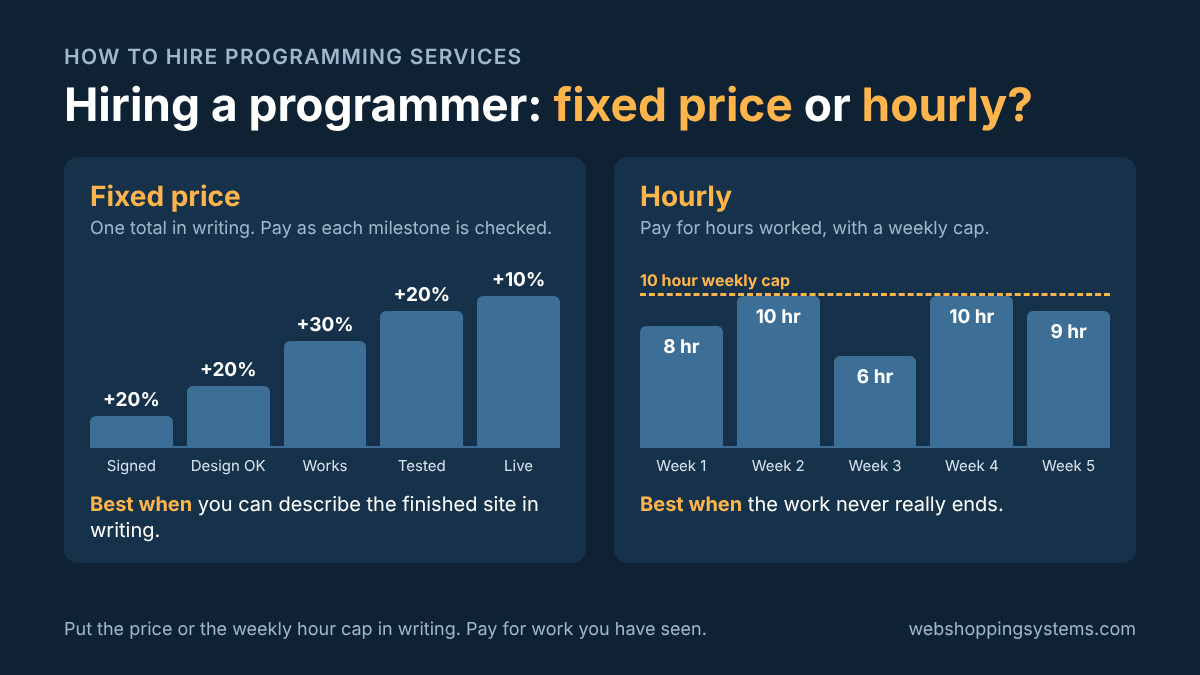
Hiring a programmer is a business decision, and the two ways to pay one work very differently. This guide explains how fixed price and hourly hiring work, when each one is the right choice, what poor planning costs, what a good website needs, and why it pays to hire a programmer who can build AI services into the site.
What is the difference between fixed price and hourly programming?
With a fixed price, you and the programmer agree on a total price for a defined result before the work starts. With hourly hiring, you pay an agreed rate for each hour worked, so the final cost depends on how many hours the work takes. In software contracts, hourly hiring is usually called time and materials.
| Fixed price | Hourly | |
|---|---|---|
| What you pay | One agreed total, paid in stages | Rate × hours worked |
| Final cost | Known before work starts | Known only when the work stops |
| Who carries the risk | The programmer, if the plan is complete | You, unless you cap the hours |
| Scope | Written down and fixed | Can change at any time |
| Changes | Priced separately as change orders | Absorbed as more hours |
| Best for | A website you can describe completely | Work with no end result, or scope you will discover as you go |
| Biggest danger | A vague plan, so the price is too high or the work is cut short | No limits, so hours and cost drift upward |
| What you need before you sign | A written plan of what "done" means | A weekly hour limit and a status report schedule |
Most projects end up using both. A common arrangement is a fixed price to design and build the website, then hourly work, or a monthly fee, for the changes that come after launch. Hybrid arrangements like this are widely recommended for the same reason: the defined work gets a firm price, and the open-ended work gets flexibility (Lean Labs).
When is a fixed price the right choice?
A fixed price is the right choice when the finished website can be described in writing before work starts. Typical examples are a business or service website, an online store with a defined catalog and checkout, a donation page, a booking form, a specific integration, or a rebuild of an existing site where every page and feature is already known. If you can answer "what will I be able to do when this is finished?" in a page or two, fixed price fits.
Four steps make a fixed-price project work.
1. Start with a well-planned website design
The price is only as good as the plan. Before anyone quotes, write down:
- Every page, and what each page is for
- Every feature, and who uses it: visitors, customers, you, your staff
- What you supply (text, photos, logo) and the date you will supply it
- What it connects to: payment processing, email, a calendar, your phone number
- Where it will be hosted, and who owns the hosting and domain accounts
- What "done" means, in terms you can test
If you cannot write this yourself, pay for it. A short planning phase, priced separately at a fixed fee or by the hour, is much cheaper than discovering the gaps in the middle of the build. The finished plan then becomes the foundation for the fixed price.
2. Get the fixed price in writing
A quote in an email is not enough. The agreement should state the total price, the deliverables, the milestones and their payments, the delivery dates, and what is not included. It should also say how changes are handled: any change outside the written plan is quoted as a change order, with its price and added time, and approved by you before work begins. Finally, it should say who owns the code, design and content when you make the final payment, and that you receive every login and a full copy of the site.
3. Set milestones
Break the project into stages that each end with something you can open and check. Short stages are safer than long ones. In McKinsey's study of more than 5,400 large IT projects, the longer a project was scheduled to last, the more likely it was to run over, and each additional year added 15% to cost overruns (McKinsey).
4. Time each payment to the completion of a milestone
Pay when a milestone is finished and you have checked it, not on a calendar date and not for time spent. Here is an example for a $6,000 website:
| Milestone | What you can check | Payment |
|---|---|---|
| Agreement signed | The written plan and price | 20% ($1,200) |
| Design approved | Page layouts on a test link, on phone and desktop | 20% ($1,200) |
| Working site | Every feature works on a test server, not yet public | 30% ($1,800) |
| Content and testing complete | Your text and photos are in, forms and payments tested, speed and security checked | 20% ($1,200) |
| Launch plus a 30-day fix period | The site is live and any bugs found in 30 days are fixed at no charge | 10% ($600) |
The amounts and percentages are an example, not a standard. What matters is that each payment follows something you can see. Holding back a final payment until after launch gives the programmer a reason to stay responsive when something turns up.
A fixed price also protects the programmer, because the plan defines the work. If you add a feature later, that is a change order, not a surprise on either side.
When is hourly the right choice?
Hourly is the right choice when you cannot describe an end result, or when the work will change as you go. Ask one question: is there a day this project is finished? If the answer is no, a fixed price will either be padded to cover the unknowns or it will break down at the first change request.
Hourly hiring fits these situations best:
- Websites with no end result. A site you will keep adding to: new pages, new reports, new features as the business grows.
- Modifications on demand. You do not know what you will need next month, only that you will need something.
- Exploring an idea. The scope is not known yet, and defining it may take as much work as building it. Hourly work on a small first version teaches you what to build.
- Fixing and maintaining existing code. Tracking down a bug or updating a site after a server change cannot be priced until someone has looked at it.
- Support after launch. Small, unpredictable requests that do not justify a new quote each time.
Hourly work needs more protection than a fixed price does, because nothing in the structure stops the hours from growing. Put these three terms in writing.
Set a maximum number of hours per week
Agree on a weekly limit, for example 10 hours, and on what happens at the limit. The programmer stops and asks before going over. You can raise the limit any time, but the decision stays with you. Ask for an estimate before any single task that could take more than a few hours.
Agree on a payment schedule
Decide how often you will be invoiced, weekly or every two weeks, and when payment is due. Pay for hours already worked and itemized on an invoice. Avoid paying a large block of hours up front unless you have already worked with the programmer and trust the arrangement.
Agree on when work status is reported
Require a short written status report with every invoice. It should list each task, the hours spent on it, and what is planned next. Ask to see the working result on a test site every week, not only at the end. If hours and results do not match, you will see it within a week instead of at the end of the month.
The hourly rate matters, but it is not the only number. A programmer who charges more per hour and finishes in half the time costs less than a cheaper one who takes twice as long. Ask for an estimate before large tasks, and compare the hours reported each week with the results you can see.
What does poor website planning cost?
Poor planning costs you money, time and security, and the bill usually arrives after the work is under way. A project that starts without a written plan tends to fail in the same five ways.
| Problem | How it happens | What prevents it |
|---|---|---|
| Missing features | Nobody listed password reset, the admin page, sales tax, or a mobile layout, so each one shows up later as an extra | A written feature list that you review and sign off before the build |
| Cost overruns | Every gap in the plan becomes a change, and every change becomes more hours | A fixed price with change orders, or an hourly agreement with a weekly cap |
| Delayed delivery | Work gets redone because the goal moved, or the build waits on text and photos nobody scheduled | Milestone dates in the agreement, and a date for each item you must supply |
| Weak security | Logins, user roles, payment handling and backups were never part of the plan, so they were skipped or bolted on at the end | Security written into the plan and tested before the final payment |
| Limited functionality | The site was built only for today, so adding a second location, more products or more users means starting over | A short list of what you expect to add in the next two years, shared before the build starts |
The scale of the problem is documented. McKinsey and the University of Oxford studied more than 5,400 large IT projects and found that, on average, they ran 45% over budget and 7% over time, and delivered 56% less value than predicted, with software projects at the highest risk (McKinsey). Those were large projects, not small business websites. But the advice that came out of the study applies at any size: be clear on the goal, manage requirements and change requests with discipline, and deliver in short cycles with quality checks at each stage.
Security is the one that hurts most, because the cost is not only money. Two earlier articles on this site show how it plays out: I Built My App With AI. Is It Safe to Launch? explains what goes wrong when nobody plans for who can see whose data, and PHP 8.2 Ends December 31, 2026 explains what happens when nobody plans for upkeep. Both problems are far cheaper to prevent in the plan than to repair after launch.
What makes a good website?
A good website is easy to use, loads fast, is built to be found by search engines and AI search, and says clearly what you do and what the visitor should do next. All four belong in the plan, and each one can be written into the agreement as something you can test.
Easy to use
A visitor should be able to finish the main task, whether that is calling, booking, buying or donating, in a few clicks on a phone. That means plain navigation, readable text, short forms, buttons large enough to tap, and enough color contrast to read in sunlight. The simplest test costs nothing: hand your phone to someone who has never seen the site and ask them to complete the main task. Watch where they hesitate.
Fast page loads
Slow pages lose visitors, and speed is a Google ranking signal, though a small one. Google measures three Core Web Vitals on real visits. A page is rated good when the largest content element appears in 2.5 seconds or less (Largest Contentful Paint), the page responds to a tap or click in 200 milliseconds or less (Interaction to Next Paint), and the layout does not jump around, with a shift score of 0.1 or less (Cumulative Layout Shift). Google applies these at the 75th percentile of visits (web.dev). Ask the programmer to show you the results in Google's free PageSpeed Insights tool before you approve the launch.
SEO and AI search optimization
Google's guidance on AI Overviews and AI Mode says that specific optimization is not required, and that the existing SEO fundamentals still apply: allow crawling, make content easy to find through internal links, and provide a great page experience (Google Search Central). Google also published a guide to generative AI features on May 15, 2026 (PPC Land), and coverage of it reports that these features draw on the same Search index and ranking systems as regular results (WordStream). In practice, a programmer who builds the site correctly has done most of the work. Ask for unique page titles and descriptions, one clear heading structure per page, readable URLs, a sitemap, descriptive image text, structured data where it fits, HTTPS, a robots.txt file that allows crawling, and your site submitted to Google Search Console and Bing Webmaster Tools.
Clear messages
The first screen should say what you do, who it is for, and what to do next. Use plain words, put one main action on each page, and show your phone number and a contact method where people expect to find them. Approve the headline, the summary and the call to action for every page before the build starts. Good copy takes as much planning as good code.
Put each requirement into the agreement as a test the programmer can pass:
| Requirement | How to write it into the agreement |
|---|---|
| Easy to use | A new visitor completes the main task in a set number of clicks on a phone, tested on iPhone and Android |
| Fast | Key pages meet LCP 2.5 s or less, INP 200 ms or less and CLS 0.1 or less in PageSpeed Insights before launch |
| SEO and AI search | Unique titles and descriptions, sitemap, robots.txt, structured data and image text delivered, and the site submitted to Search Console and Bing |
| Clear messages | You approve the headline, summary and call to action of every page before the build |
Why hire a programmer who can build AI services into your website?
A programmer who can build AI services into the website lets your site answer questions, qualify leads and book appointments around the clock, without hiring staff for every hour. Because the AI has to connect to your pages, your calendar, your phone number and your customer records, it works best when it is planned into the website from the start and built by the same person.
The services to ask about are:
- AI text chat on your website. A chat window trained on your own information: services, hours, locations, policies and the answers you give every day. It answers visitors instantly in a conversational way, and anything it cannot answer is forwarded to you.
- AI voice chat. A human-sounding voice that answers your phone number and your website's voice chat, answers questions, sends links by text and transfers the caller to you when needed.
- Appointment scheduling by website and phone. The AI checks your real calendar, offers open times, books the appointment and sends a confirmation, whether the customer typed or called.
- Receptionist services. Greeting every visitor and caller, then routing them to sales, customer support or a person.
- Lead qualification. Asking the questions you would ask, such as what the person needs, when, where and the budget, and recording the answers with the contact so you see the best leads first.
Here's one scenario of how this works. At 9 p.m. a visitor opens your website and asks whether you can come out this week. The chat answers from the information you provided, asks for a name, phone number and the problem, offers three open times, books one on your calendar, and texts a confirmation. In the morning you have a new lead with a qualified request and an appointment, and you did nothing.
Here's another scenario: a customer calls after hours. The voice receptionist answers, finds out whether the call is about a sale or a support question, answers common support questions from your own documentation, sends a link by text, and either books an appointment or takes a message with all the details. Everything is stored with the contact for future reference.
Plan the compliance in, too
The rules for automated calls and texts are strict. The FCC ruled in February 2024 that calls using AI-generated voices are "artificial" voices under the Telephone Consumer Protection Act (TCPA). That means a business needs prior consent before calling someone with an AI voice, and prior express written consent for marketing calls (Orrick). Text marketing has its own opt-in rules. Ask any programmer who offers AI services how consent is collected and recorded, how people opt out, and how callers are told they are talking to an AI. This article is general information, not legal advice.
How AI services are usually priced
AI services often mix both payment structures. Training the AI and connecting it to your website, calendar and phone number is a defined job that suits a fixed setup fee. Ongoing hosting, phone minutes, and updating the AI when your services change suit a monthly fee or hourly work. Ask for both in writing, along with who owns the trained information if you decide to move on.
What should you ask before you hire a programmer?
Before you hire a programmer, ask for finished work you can visit, a written plan, and a written agreement that covers the payment structure, changes, ownership, security and support. Use this checklist with every programmer you consider.
- Can I see finished work? Ask for live websites you can visit and click through, and for a client you can contact.
- Who will do the work? Get the name of the person writing the code. Find out whether any of it is subcontracted.
- Will I get a written plan first? The plan lists pages, features, users and what "done" means. If you do not have one, ask for a priced planning phase.
- Is the payment structure in writing? For fixed price: the total, the milestones and the payment for each. For hourly: the rate, the maximum hours per week, the invoice schedule and the status report schedule.
- How are changes handled? Changes outside the plan should be quoted, with price and time, and approved by you before work begins.
- Who owns the code, design and content? You should own them at final payment, with every login and a full copy of the site.
- How is security handled? Ask about logins, user roles, how payments are processed, input checking and backups.
- How do I accept each milestone? Agree on how many days you have to review it and what counts as complete.
- What happens after launch? Ask for a bug-fix period in writing, and the rate for changes after that.
- Are the hosting and domain accounts in my name? They should be, so you are never locked out of your own website.
- Can you add AI chat, voice, scheduling and lead qualification? If so, ask how consent for calls and texts is collected, and how the AI is kept up to date.
If you would like a written plan and a fixed price for your website, or an hourly agreement with a weekly limit for ongoing work, contact Web Shopping Systems at <info@webshoppingsystems.com> or 1-888-508-0830. Please feel free to let me know if you have any questions.
Frequently asked questions
Should I hire a programmer for a fixed price or by the hour?
Choose fixed price when you can describe the finished website in writing before work starts. Choose hourly when the work has no clear end result, such as ongoing changes, or when you will only learn what you need as the project goes. Many clients use both: a fixed price to build the site, then hourly for changes afterward.
How should I pay a web developer on a fixed-price project?
Pay by milestone, not by date. Get the total price in writing, divide the work into stages you can check yourself, and pay each portion when that stage is finished and approved. A common split is a deposit to start, then payments for approved design, a working site on a test server, completed content and testing, and a final payment after launch.
How do I keep hourly costs under control?
Set a maximum number of hours per week in writing, agree on how often you will be invoiced, and require a short status report with each invoice that lists tasks and hours. Ask for an estimate before any task that could take more than a few hours.
What happens if I want changes on a fixed-price project?
Changes outside the written scope are handled as change orders. The programmer quotes the extra price and time, you approve it in writing, and only then does the work start. Without that rule, small changes pile up as disputes or surprise charges.
Can AI answer my website chat and phone calls and book appointments?
Yes. A programmer can add an AI chat to your website and an AI voice receptionist to your phone number that answer questions from your own information, qualify sales leads, handle common support questions and book appointments on your calendar. Calls and texts that you send out using AI voices or automated messages require consent under the TCPA, so ask how consent is collected and recorded.
About the author
Kimberly Carr has written web software in core PHP for 25 years. She rewrote and maintained the GiveDirect.org fundraising platform from 2012 to 2021, including its donor portals, accounting and payment processing, and her code for a U.S. Department of Housing and Urban Development project passed its security review on the first review. She runs Web Shopping Systems, where she builds custom PHP applications and payment systems with Claude Code, adds AI text chat, voice and scheduling to business websites, and reviews every release herself.
Sources
Checked November 9, 2026.
- Delivering large-scale IT projects on time, on budget, and on value, McKinsey and the University of Oxford: 45% over budget, 7% over time, 56% less value than predicted, across more than 5,400 IT projects; each added year of schedule adds 15% to cost overruns.
- How the Core Web Vitals metrics thresholds were defined, web.dev: LCP, INP and CLS thresholds.
- AI features and your website, Google Search Central: SEO fundamentals still apply to AI Overviews and AI Mode.
- Google's new guide for AI search, PPC Land: coverage of Google's May 15, 2026 guide to generative AI features.
- Did the FCC Really Ban AI-Generated Voice Calls?, Orrick: the FCC's February 2024 TCPA ruling on AI-generated voices.
- Fixed-price vs time-and-materials, Lean Labs: when each pricing model fits, and hybrid arrangements.
- Google's AI search guidelines, WordStream: generative AI features use the same Search index and ranking systems.